














Workplace Ergonomics to Prevent Pain: How to Adjust Your Routine and Protect Your Joints, Spine, and Heart
Whether at the office or at home, spending many hours sitting in front of a screen can take its toll. It’s not uncommon for lower back pain to set in, shoulders to tense up, and the neck to stiffen throughout the day. At work, for example, many people put up with these aches and pains as if they were an inevitable part of the job. What few realize is that sitting or remaining motionless for hours on end doesn’t just affect your muscles and joints. That’s where ergonomics comes in.
Prolonged sedentary behavior is also associated with changes in blood vessel function and, over time, an increased risk of hypertension and cardiovascular disease. For this reason, it warrants special attention in people who already have cardiovascular risk factors.
The question that rarely comes up in conversations about ergonomics is precisely this: Why is posture at work still treated as a “spine” issue when science has shown that prolonged sedentary behavior affects the heart, metabolism, and even sleep quality? There is a disconnect between what we know about the risks of sitting and what we actually do to change this in our work routines.
This content connects workplace ergonomics—aimed at preventing pain—to a broader perspective on health. No treatment prescriptions, no technical jargon. The focus is on practical adjustments that protect your joints, spine, and heart, with tips you can apply today—whether at the office or working from home—without needing any special equipment.
What Is Ergonomics and Why Does It Matter After Age 45?
Ergonomics is the science that studies the relationship between the human body and the work environment. Its goal is to adapt tools, furniture, and routines so that physical effort is distributed evenly, reducing strain that, over time, leads to pain, injuries, and loss of mobility.
As we age, our joints, intervertebral discs, and muscles can become more vulnerable to strain. According to the Osteoarthritis Research Society International (OARSI), osteoarthritis is not merely “cartilage wear and tear.” It is a disease that affects the entire joint, including the cartilage, bones, synovial membrane, and other surrounding tissues. Over time, these changes can cause pain, stiffness, and difficulty performing everyday movements.
Ergonomics doesn't always require major investments. Often, it starts with simple adjustments, such as positioning the monitor at the proper height, adjusting the chair, supporting your feet properly, and taking short breaks throughout the day to change positions and move around. These measures can help reduce discomfort and lessen the strain on muscles and joints caused by spending long periods in the same posture.
However, on their own, they are not enough to prevent all work-related problems. The best results are usually achieved when these precautions are combined with a more active routine, task variety, and guidance from a professional whenever necessary.
Is sitting all day bad for your heart? What we know
The short answer is yes. Studies published over the past two decades by organizations such as the American Heart Association (AHA), Columbia University Irving Medical Center, the Mayo Clinic, NHS Foundation Hospitals, and the National Institutes of Health (NIH) show that prolonged sedentary behavior is associated with an increased risk of cardiovascular disease, regardless of whether a person exercises outside of work hours. In other words: working out in the morning may not offset the effects of sitting for eight consecutive hours.
When you remain still for long periods, blood flow in your legs decreases. The muscles in the lower limbs, which act as an auxiliary pump for venous return, become less active. This promotes the pooling of blood in the extremities, increases peripheral vascular resistance, and can contribute to elevated blood pressure over time.
In addition, lipid and glucose metabolism may be altered. Reviews published by the National Institutes of Health (NIH) indicate that a sedentary lifestyle reduces the activity of lipoprotein lipase, an enzyme involved in triglyceride metabolism, and impairs lipid and carbohydrate metabolism. In practice, long periods of sitting may be associated with changes in cardiometabolic markers, such as triglycerides, glucose, and lipid profile.
The American Heart Association (AHA) recommends that adults get at least 150 minutes of moderate physical activity per week, but it emphasizes a point that is often overlooked: reducing the amount of time spent sitting—even during light activities—already helps lower the risks associated with a sedentary lifestyle. Posture at work and cardiovascular health are more closely linked than most people realize.
Common Aches and Pains Caused by Poor Posture at Work
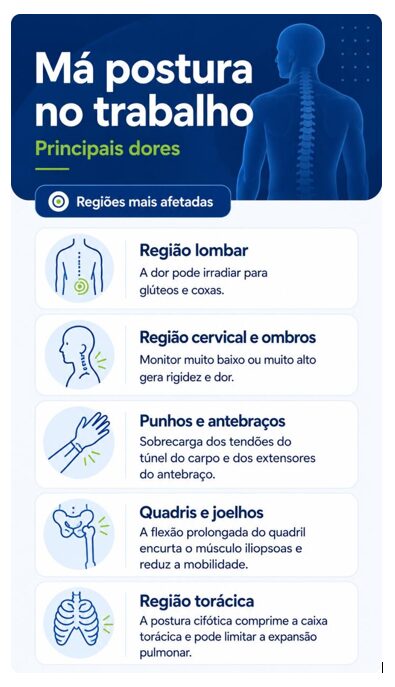
Lower back pain in the office is the most common complaint, but it is far from the only one. According to the Occupational Safety and Health Administration (OSHA) and the Mayo Clinic, poor posture distributes weight unevenly across the spine and joints, creating patterns of tension that build up over the months. The most affected areas are:
- Lower back: Sitting without proper support for the natural curve of the lower back increases pressure on the L4-L5 and L5-S1 intervertebral discs, the most vulnerable areas of the lower spine. The pain may radiate to the buttocks and thighs.
- Neck and shoulders: A monitor that is too low or too high forces the neck into excessive flexion or extension. Over time, the trapezius and scalene muscles go into spasm, causing stiffness and referred pain that can extend all the way to the base of the skull.
- Wrists and forearms: Typing with the wrists in a forced flexion or extension position puts excessive strain on the tendons in the carpal tunnel and the forearm extensors, increasing the risk of tendinitis and paresthesia.
- Hips and knees: Prolonged hip flexion shortens the iliopsoas muscle and reduces mobility in the hip joint. In the knees, a lack of movement decreases the production of synovial fluid, increasing the feeling of stiffness when standing up.
- Thoracic region: Kyphotic posture, with the shoulders protruding forward, compresses the rib cage and can limit lung expansion, even affecting oxygenation.
These pains don't appear overnight. They develop gradually, which makes it easy to get used to them. But getting used to them doesn't mean the body is healthy. It means it's adapting to a condition that, if left untreated, tends to get worse.
Simple adjustments you can make right now to your desk and chair
The good news is that ergonomics for people who work sitting down doesn’t depend on expensive furniture. It depends on proper positioning. Here’s how to adjust your chair to prevent back pain and set up your workspace in a functional way, following the Mayo Clinic’s guidelines:
Chair
- Adjust the height so that your feet are flat on the floor, with your knees at an angle of about 90 degrees. If the chair is too high, use a footrest.
- The backrest should support the natural curve of the lower back. If the chair doesn't have lumbar support, a rolled-up towel or a firm cushion placed in the waist area can make a difference.
- Avoid sitting on the edge of the chair. Use the backrest. It's there to distribute the weight on your spine, not just for decoration.
- Try to keep your hips slightly higher than your knees. This position promotes proper spinal alignment and can reduce strain on the lower back.
Monitor
- The top edge of the screen should be at eye level or slightly below. This prevents cervical flexion or extension.
- The ideal distance is one outstretched arm, approximately 50 to 70 centimeters.
- If you use a laptop, consider using a laptop stand along with an external keyboard and mouse. Working for hours with your neck bent over a low-set screen can contribute to pain and stiffness in the neck.
Keyboard and mouse
- Position the keyboard so that your elbows are close to your body, forming a 90-degree angle or slightly wider.
- Your wrists should remain in a neutral position, without bending upward or downward. A wrist rest can help, as long as it is used during breaks and not while typing.
- The mouse should be at the same height as the keyboard, close enough that you don't have to stretch your arm.
Table Arrangement
- Frequently used items, such as a phone, pen, and glass of water, should be within arm's reach without you having to turn your torso.
- Documents that need to be referred to while typing are best placed on a stand next to the monitor, at the same height, to avoid repetitive neck-bending movements.
Active Breaks: How to Incorporate Movement Without Leaving the Office
Adjusting your workstation solves part of the problem. The other part requires movement. No posture, no matter how perfect, is meant to be held for hours on end without a break. The body needs variety.
Try to break up long periods of sitting with short, frequent breaks. A practical guideline is to get up or switch activities every 30 to 60 minutes, adjusting as needed based on your routine.. It doesn't have to be a structured exercise. It can be:
- Walk to the kitchen to fill my glass with water.
- Standing while on a phone call.
- Do a short series of stretches for your neck, shoulders, and hips.
- Go up one flight of stairs, if there is one.
- Make circular movements with your ankles and wrists while standing.
These breaks do not hinder productivity. On the contrary, studies show that brief interruptions in sitting can improve concentration and reduce muscle fatigue throughout the day. For those with cardiovascular risk factors, this metabolic effect is especially important.
If you use a cell phone or computer, set a silent alarm every 50 minutes. It may seem trivial, but most people don't realize how long they've been sitting still until the pain sets in.
Ergonomics for People Who Work from Home: What's Changing
Working from home has brought flexibility, but it has also brought sofas, dining tables, and chairs that were never designed for eight hours of continuous use. Lower back pain in the home office is just as common as in the corporate office, with the added complication that at home the boundaries between work and rest blur, and the amount of time spent sitting tends to increase.
The ergonomic principles are the same. What changes is the need to adapt what you already have. According to information adapted from the Mayo Clinic, a few adjustments can be made:
- Is your dining table too high? Use a firm cushion on the seat to raise your hips and maintain the correct alignment between your elbows and the work surface.
- A chair without lumbar support? The rolled-up towel works well. Place it at waist level, not in the middle of your back.
- Is a laptop your only device? Investing in an external keyboard and mouse, along with a stand to raise the screen, is the most cost-effective solution for those who work from home.
- Inadequate lighting? Working in a dark environment or with glare on the screen strains the eye muscles and, as a result, alters your neck posture. Position your desk perpendicular to the window; never face or turn your back to natural light.
Another point worth noting about working from home: the tendency to work longer hours without getting up. Without coworkers inviting you out for coffee or in-person meetings that require travel, your body remains stationary for even longer periods. Active breaks need to be intentional. Schedule them as appointments.
Frequently Asked Questions About Ergonomics and Pain Prevention
Does workplace ergonomics really prevent back pain?
Yes. Properly adjusted furniture and posture reduce the mechanical strain on the spine and joints, thereby lowering the incidence of musculoskeletal pain. The goal is not to eliminate all risk, but to significantly reduce the factors that cause chronic pain in people who work in a seated position for long periods of time.
What's the best chair for people who spend long hours sitting at work?
More important than the brand or model is the ability to adjust the chair. A good office chair allows you to adjust the seat height, depth, backrest angle, and lumbar support. If it offers these adjustments and you use them correctly, it already fulfills its essential ergonomic function.
Can sitting for many hours affect your heart?
Yes. According to the American Heart Association (AHA), prolonged sedentary behavior is associated with an increased risk of cardiovascular disease, including high blood pressure, elevated triglycerides, and changes in glucose metabolism. Breaking up periods of sitting with active breaks—even brief ones—helps mitigate these effects.
How often should I get up during work?
The Mayo Clinic It suggests starting by taking short breaks from sitting to stand up every 30 minutes. Columbia University Irving Medical Center also cites studies showing that walking for five minutes every 30 minutes reduced the harmful effects of sitting, including blood sugar levels and blood pressure. Try to break up long periods of sitting with brief breaks throughout the day. One practical option is to get up at regular intervals to walk around or stretch for a few minutes.
Does stretching at the office help prevent joint pain?
Help. Gentle stretches for the neck, shoulders, hips, and ankles help maintain joint range of motion and reduce the stiffness that builds up with inactivity. For those who already experience joint stiffness in their daily lives, these breaks are even more important.
Is standing all day better than sitting?
Not necessarily. Standing for hours on end can also put a strain on your body, especially your feet, knees, and lower back. According to sources such as the Mayo Clinic, the NHS, and the AHA, it’s best to alternate between sitting and standing throughout the day. Height-adjustable desks make this easier, but they aren’t required. Simply getting up frequently has a similar effect.
Workplace ergonomics to prevent pain isn’t something you can address once and then forget about. It’s an ongoing practice, made up of small, consistent adjustments. For those over 45 or who suffer from back pain, joint stiffness, or concerns about heart health, these precautions are no longer just a matter of comfort; they become an integral part of maintaining health and quality of life.
Workplace Interventions to Increase the Ability to Stand or Walk to Reduce Musculoskeletal Symptoms in Sedentary Workers | Cochrane